How to Add a Live YouTube Subscriber Counter to Your Website (Free)
By TubeScope Editorial Team · 2026-09-02 · 6 min read
Your subscriber count is the most persuasive number you have — and on your own website it's usually a screenshot from six months ago. Here's how to put a live one there instead: a counter that updates itself forever, takes about a minute to install, and costs nothing.
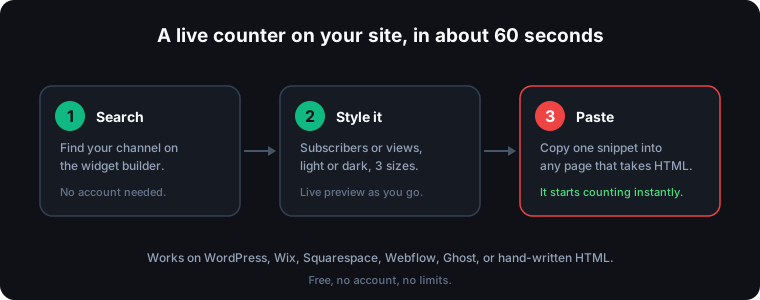
The 60-second version
- Open the free TubeScope widget builder.
- Search your channel by name and pick it from the list.
- Choose what to show — subscribers or total views — then a theme (auto, light, or dark) and a size. A live preview updates as you click, and it's the real widget, already counting.
- Hit Copy snippet and paste it into your page.
That's it. No account, no API key, no limits, and nothing to maintain — the counter keeps itself current.
Where to paste it
No website? That's the most common case, and it's fine — most creators' "website" is the link-in-bio page their Instagram or TikTok profile points at, and some of those take embeds:
- Carrd — add an Embed element and paste. Carrd runs any iframe, and it costs a few dollars a year, which is why so many creators use it.
- Notion (used as a public page) — paste the snippet into an embed block.
- Linktree — sorry, no. It only supports its own built-in blocks, not arbitrary HTML, so the widget can't run there.
Streaming? The widget is a normal web page, so its URL works as a browser source in OBS or Streamlabs — a live subscriber count sitting on your overlay. The dark theme usually sits best over a stream layout.
If you do have a site, paste it anywhere that accepts HTML:
- WordPress — add a "Custom HTML" block, paste, publish.
- Wix / Squarespace — drop in an Embed or Code element and paste.
- Webflow — use an Embed component.
- Ghost — insert an HTML card.
What about Instagram and TikTok?
You can't embed it there — neither platform allows third-party HTML in posts, stories, or bios, and no tool can work around that. What you can do is put the link to your live counter page in your bio, or in the bio-link page above. Anyone who taps it sees your count updating in real time.
The snippet itself is two short lines — an embed and a small credit link:
<iframe src="https://tube-scope.com/embed/counter/YourChannel?theme=auto"
        width="320" height="180" frameborder="0" scrolling="no"></iframe>
<p><a href="https://tube-scope.com/live-counter/YourChannel">Live subscriber count</a> by TubeScope</p>
The builder fills in your channel and settings automatically, so you never have to edit that by hand.
What people actually use it for
- Social proof on a homepage or press page. A live number reads as real in a way a static screenshot never does.
- Milestone pages. Chasing 100K? Put the counter on a page and let people watch it climb with you.
- Stream overlays. The widget is just a web page, so it works as a browser source in OBS or Streamlabs.
- Link-in-bio and portfolio sites. Show the number instead of claiming it.
- Sponsor and media kits. A brand checking your page sees today's figure, not last quarter's.
How the number stays honest
Two things happen behind the scenes, and it's worth knowing both:
The widget re-syncs with YouTube's public figures every 15 seconds. Between those syncs it ticks upward at the channel's measured growth pace — we track how fast real channels actually gain, so the movement reflects reality rather than a decorative animation. Every sync re-aligns the count with the figure YouTube publishes.
Worth remembering: YouTube rounds public subscriber counts for channels above 1,000 subscribers, so every public counter — ours included — shows the closest official number rather than a to-the-digit total. Only the creator sees the exact figure, in YouTube Studio. Any tool claiming otherwise is guessing.
Will it slow my site down?
No. The widget is a tiny self-contained page with no frameworks or trackers, and it loads in its own frame — so it can't block your page from rendering, and it does its updating quietly in the background. Give it a moment on first load and it's live.
About that credit link
The snippet includes a small visible line: "Live subscriber count by TubeScope." That link is how the widget stays free for everyone, and it tells your visitors where the live data comes from.
Want the full-screen version instead of an embed? Every channel has its own live counter page you can bookmark or share — and if you'd rather watch two channels race, try a Sub Battle.
Frequently asked questions
How do I add a live subscriber count to my website?
Search your channel on the widget builder, pick a theme and size, then paste the snippet wherever you keep your public page. No website needed: link-in-bio builders that accept embeds (Carrd, Notion) work, and the widget URL also runs as an OBS or Streamlabs browser source. If you do have a site, any HTML block works — WordPress, Wix, Squarespace, Webflow, or Ghost. Instagram and TikTok don't allow embeds, so link your live counter page there instead.
Is the subscriber count widget free?
Yes — completely free, with no account and no usage limits. The snippet carries a small visible credit link back to TubeScope, which is how it stays free.
Can I use the widget as an OBS stream overlay?
Yes. The widget is a normal web page, so you can add its URL as a browser source in OBS or Streamlabs at whatever size you like. The dark theme usually sits best over a stream layout.
Why doesn't the widget show my exact subscriber count?
YouTube rounds public subscriber counts for channels above 1,000 subscribers, so no public tool can display the exact figure — only YouTube Studio shows creators their precise number. The widget displays the closest official public figure and keeps it current.
Does the widget slow down my website?
No. It's a tiny standalone page with no frameworks or trackers, loaded in its own frame so it never blocks the rest of your page from rendering.
Try it yourself: Counter Widget · Live Sub Counter · Sub Battle