How to See Any YouTube Channel's Live Subscriber Count
By TubeScope Editorial Team · 2026-07-02 · 6 min read
Want to watch a channel's subscriber count tick up in real time — for a milestone, a sub race, or just curiosity? The short answer: open a live subscriber counter, type the channel's name, and the count starts updating automatically. The longer answer involves one thing most people don't know: the exact count is only visible to the channel's owner, and every public counter on the internet — including ours — shows YouTube's official rounded figure. Here's how it all works.
The quick way
- Open TubeScope's free Live Subscriber Counter.
- Search any public channel by name (or jump straight to a popular one, like the MrBeast live count or PewDiePie live count).
- Watch the count tick in real time — it re-syncs with YouTube about every 10 seconds. Pause it, refresh manually, or share the page URL, which links directly to that channel's counter.
No login, no API key, works for any public channel.
Why every public counter shows a rounded number
Since 2019, YouTube has publicly displayed abbreviated subscriber counts for channels with more than 1,000 subscribers. A channel with 1,234,567 subscribers publicly shows as "1.23M" — and that rounded figure is all YouTube publishes to anyone. Only the creator, inside YouTube Studio, sees the exact real-time number:
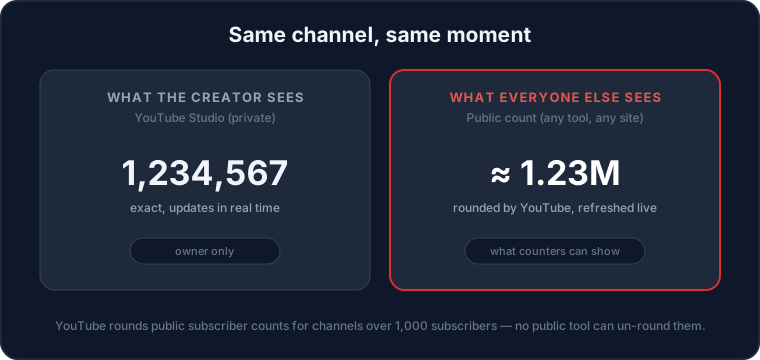
So if a counter site claims to show a big channel's exact live count, it's estimating the digits between YouTube's rounded steps. TubeScope shows the most precise figure YouTube actually publishes — updated live, honestly labeled.
What "live" really means
A live counter polls YouTube's public statistics on a short cycle (TubeScope re-syncs about every 10 seconds, ticking between refreshes at the channel's estimated growth pace) and animates the change. For fast-growing channels you'll see the number step upward as YouTube updates its published figure; for smaller or slower channels the public count moves less often, because the rounding steps are coarser the bigger a channel gets.
What people use live counters for
- Milestone moments — watching a channel cross 1M, 10M, or 100M in real time (or filming your own milestone for a video).
- Sub races — tracking two channels head-to-head, like the famous PewDiePie vs T-Series race. Open two counters side by side, or compare the channels directly.
- Streams and events — keeping a live count on screen during a livestream or watch party.
- Creator check-ins — a quick pulse on your own growth between Studio sessions.
Beyond the count: seeing the full picture
A subscriber number on its own says less than people think — growth rate, views, and engagement tell you whether a channel is actually rising (our guide to comparing channels explains why). From any TubeScope counter you can jump to the channel's full analytics page for views, health score, and an earnings estimate, or browse the most subscribed channels to see today's rankings.
The quick takeaways
- Use a live counter — type a channel name and the count updates automatically.
- YouTube rounds public counts above 1,000 subscribers; only the creator sees the exact figure in Studio.
- "Exact" public counts for big channels are estimates — honest tools show the official rounded number.
- For milestones and sub races, shareable per-channel counter pages beat screenshots.
Frequently asked questions
How can I see a YouTube channel's live subscriber count?
Use a free live counter tool: search the channel by name and the count updates automatically (TubeScope re-syncs with YouTube about every 10 seconds). Each channel gets a shareable counter page you can keep open during milestones or streams.
Can I see the exact subscriber count of any channel?
No. Since 2019 YouTube publicly shows rounded (abbreviated) counts for channels over 1,000 subscribers. Only the channel owner sees the exact real-time figure in YouTube Studio — every public tool works from the official rounded number.
How often do live subscriber counters update?
TubeScope re-syncs with YouTube about every 10 seconds and ticks between refreshes at the channel's estimated growth pace. How often the official figure itself changes depends on the channel: bigger channels have coarser rounding steps, so the public number moves in larger, less frequent jumps.
Why did the famous sub-race counters show exact numbers?
Before YouTube's 2019 change, exact public counts were available and tools could display them digit by digit. Today's counters show YouTube's official rounded figures — sites that display 'exact' digits for large channels are estimating between rounding steps.
Does checking a live counter affect the channel?
No. Counters read publicly available statistics — they don't interact with the channel, add views, or affect its metrics in any way.
Try it yourself: Live Subscriber Counter · Top Channels · Compare Channels